
Requested Reports
Whenever a report of any type is requested, the request will be recorded and displayed in the requested reports table.
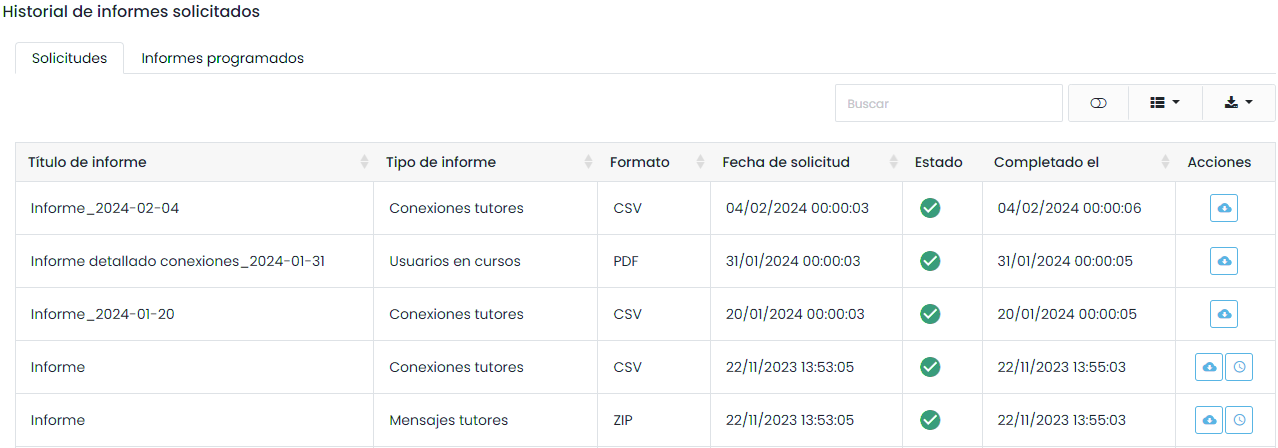
In this table, we can see information such as the type of report and the request date. Each record will be accompanied by an icon indicating the status of the report.
Pending: The request has been received and will be executed when it reaches the top of the queue on the server.
In Progress: The request is being executed. Depending on the size of the request, we will need to wait for the necessary time.
Completed: The report is available for download. We can download it by selecting the icon.

Scheduled Reports
The platform allows scheduling the generation of recurring reports that will be processed automatically.
Once the report generation is complete, a scheduling button will appear next to the download button.
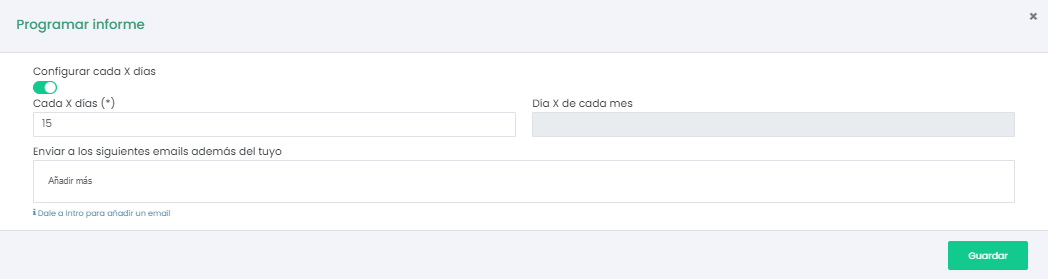
We can select two types of periodicity: the X day of each month or every X days.
This report will be automatically sent to the email of the user who requested the report. We can also include more email addresses to which the report will be sent.
By clicking “Save,” the schedule will be recorded in the “Scheduled Reports” tab.
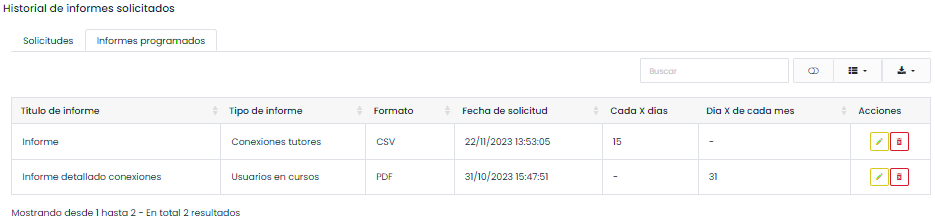
These schedules can be edited to, for example, modify the report recipients or cancel them entirely if they are no longer relevant.