Platform Announcements
Platform announcements allow creating communications for users that will be displayed when logging into the platform.
To manage general announcements, from the sidebar menu, click on “Announcements”. This will take you to the announcement management table.
If you want to view the announcements shown to your user, click on “General Announcements”.
REMEMBER
Do not confuse them with Course Announcements. Course announcements are exclusive to the users of the respective course.
Create an Announcement
To add an announcement, from the announcement management table, click the “Add” button.

A modal will appear where you can create the new announcement.
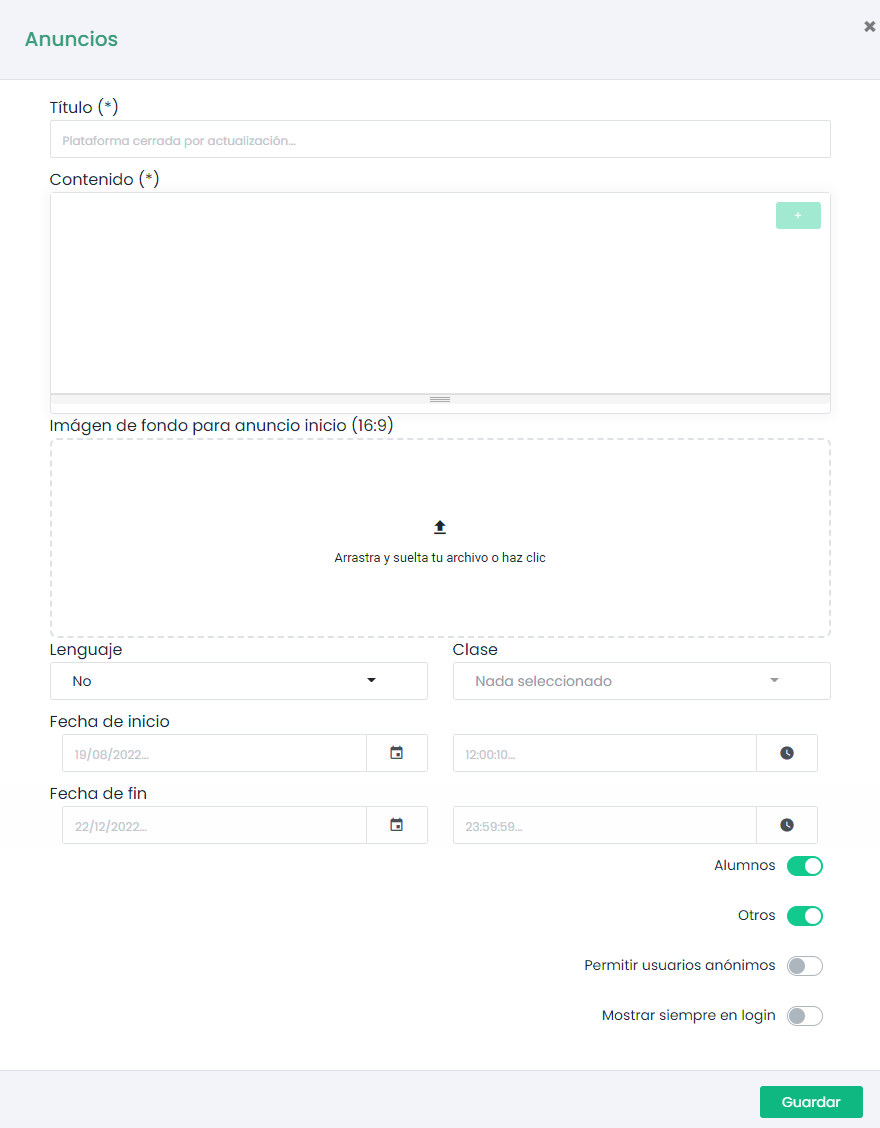
The first step is to give your announcement a title and create the content you want to communicate.
REMEMBER
You can use the extended editor to format the text of your announcement, as well as access the library to add images and videos.

Announcements have a series of filters that allow us to select exactly which type of user our communication will be directed to, as well as the dates during which it will be active.
If our platform shows an announcement on the login page (This functionality must be previously enabled by the super-admin), we can add our communication to that screen by enabling the “Allow anonymous users” parameter.
It is also possible to configure our announcement to be displayed each time the user logs into the platform, instead of only the first time since its creation. To do this, enable the “Always show at each login” parameter.
Finally, click “Save” and your announcement will be added to the table.
To edit or delete announcements, use the action buttons in the management table.